Windows downloads and security prompts
What both products have in common
Section titled “What both products have in common”The current Windows releases of miao and mtty do not carry an Authenticode publisher signature. Windows may therefore show a SmartScreen warning when you run a downloaded program, or an unknown-publisher prompt when an installer requests administrator access. The exact wording depends on the Windows version, download reputation, and device policy; a prompt may not appear every time.
This is a publisher-verification warning, not a finding that the software is malware. A separate antivirus detection is different: if Defender or another antivirus names a threat, stop and report the release and detection name instead of allowing it.
SmartScreen: “Windows protected your PC”
Section titled “SmartScreen: “Windows protected your PC””This is one possible SmartScreen dialog. Select More info to reveal the app name and the Run anyway option, if your device policy allows it.
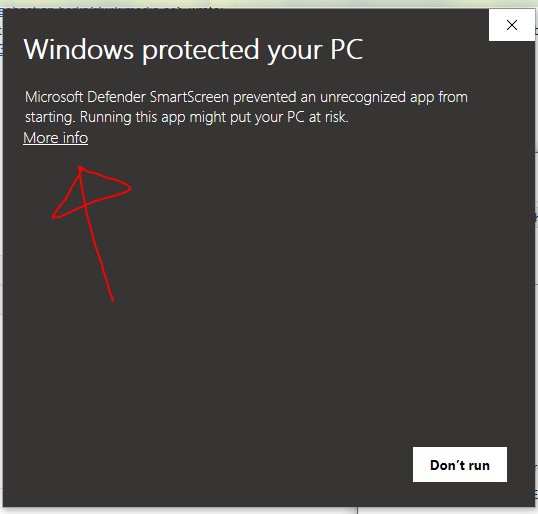
Screenshot source: Microsoft Defender SmartScreen screenshot on Wikimedia Commons.

Only continue if you downloaded the file from the project’s official release page and the displayed app matches the file you intended to run:
- Select More info.
- Check the displayed app name.
- Select Run anyway, if available.
If your organization blocks the app or Run anyway is unavailable, ask the device administrator. Do not disable SmartScreen or Smart App Control to get around the restriction. Code signing can help identify a publisher, but SmartScreen may still warn about an app without enough reputation.
What differs between miao and mtty
Section titled “What differs between miao and mtty”| miao | mtty | |
|---|---|---|
| Windows download | miao-windows-x64.zip, containing miao.exe |
mtty-windows-x86_64.zip or mtty-app-<version>-x86_64.msi |
| Installation | PowerShell script or manual ZIP extraction; installs under the user directory | MSI installer or manual ZIP extraction |
| Windows Authenticode signature | miao.exe is unsigned |
The current MSI and ZIP executables are unsigned. In the v0.1.2 release, CI skipped MSI signing because its Windows certificate was not configured. |
| Separate release signature | No detached signature is listed with the current miao Windows asset | Windows ZIP and MSI releases include detached .sig files and a minisign public key. These can verify the downloaded archive or installer, but Windows does not treat them as Authenticode signatures and they do not identify a Windows publisher. |
Get miao from miao GitHub Releases, and mtty from mtty GitHub Releases. miao’s Windows-specific notes cover its PowerShell installer. mtty’s install guide covers its MSI and ZIP packages.
For the mtty v0.1.2 signing status, see the release assets and Windows release workflow.